How to connect 42min to n8n
The quickest way in is the 42min community node, verified by n8n. Its 42min Trigger starts a workflow on every booking event, and its 42min node books, reschedules, cancels, and looks up meetings. Would you rather wire it yourself? n8n's built-in Webhook and HTTP Request nodes work against the same signed webhooks and REST API, and this guide covers that path in full.
Two-way synchronization
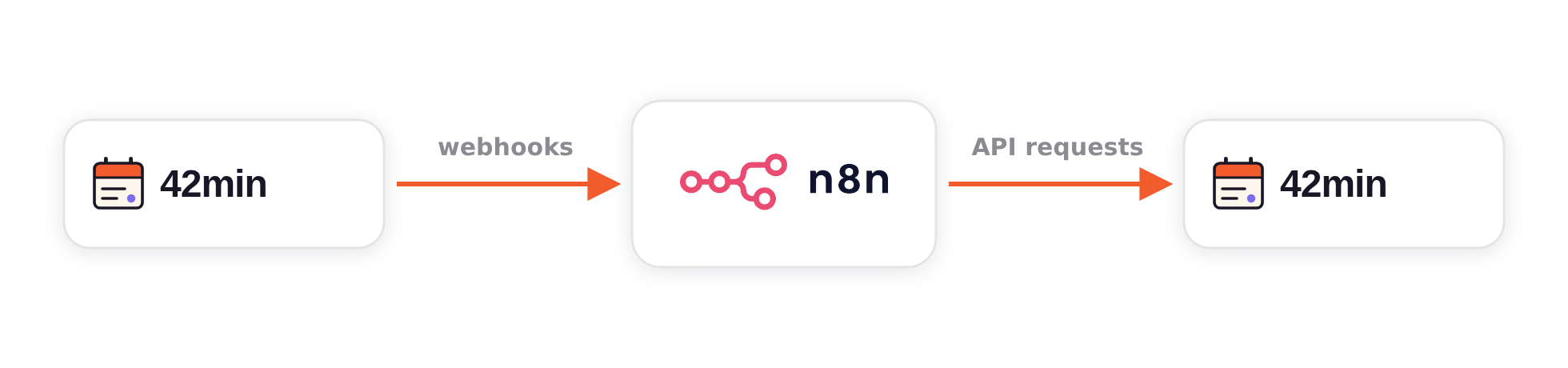
Events out. A webhook is a URL on your side that 42min calls the moment a booking is created, rescheduled, canceled, marked a no-show, or edited. Point one at an n8n Webhook node and every one of those moments becomes a workflow run.
Actions in. The Public REST API reads and writes the same data you see in the dashboard: free slots, bookings, event types. The same workflow can answer back, whether that's creating a booking, moving one, or stamping a CRM id onto it.
Bookings into n8n in 3 steps
These are the steps for wiring it by hand. The 42min node skips them: its trigger registers the webhook and keeps the signing secret itself, and the Help Center walks through installing it and connecting your account.
Start an n8n workflow with a Webhook node
Add a Webhook node, set its method to POST, and copy the Production URL. The Test URL only listens while you're clicking “Listen for test event”. On n8n Cloud the URL is already public HTTPS, which is what 42min requires.
Register the URL in 42min
In Admin Center → API, open the Webhooks tab and click Add webhook. Paste the n8n URL, pick the events this flow cares about, and save. 42min shows the webhook's signing secret exactly once; store it now, you'll need it to verify deliveries.
Send a test, then go live
Use Send test on the webhook's row to fire a synthetic booking.created at n8n, and View logs to watch the delivery land. When the run looks right, activate the n8n workflow so the Production URL is listening around the clock.
Prove it's really 42min
An unverified webhook endpoint accepts anything that finds the URL. Every 42min delivery therefore carries X-42min-Webhook-Signature: t=<unix seconds>,v1=<signature>, where v1 is an HMAC-SHA256 of timestamp.body computed with your webhook's signing secret. The 42min Trigger checks it for you and rejects anything that fails. With a plain Webhook node, a Code node can check it just as well.
Enable Raw Body on the Webhook node (the HMAC must be computed over the bytes exactly as received), then make this the first node after it:
// Code node · “Run Once for Each Item”.
// Upstream Webhook node: method POST, “Raw Body” enabled.
const crypto = require('crypto');

// The 42min_wh_… signing secret, shown once when the webhook was added.
// $vars needs n8n Variables; on self-hosted n8n, $env works too.
const secret = $vars.FORTYTWOMIN_WEBHOOK_SECRET;

// Header: X-42min-Webhook-Signature: t=<unix seconds>,v1=<hex hmac>
const header = $json.headers['x-42min-webhook-signature'] ?? '';
const { t, v1 } = Object.fromEntries(header.split(',').map((p) => p.split('=')));

// HMAC over the raw bytes exactly as received. Never re-stringify the
// parsed body; re-serializing can reorder keys and break the comparison.
const raw = Buffer.from($input.item.binary.data.data, 'base64');
const expected = crypto
  .createHmac('sha256', secret)
  .update(t + '.' + raw.toString('utf8'))
  .digest('hex');

const stale = Math.abs(Date.now() / 1000 - Number(t)) > 300; // ~5 minutes
const genuine =
  !!v1 && v1.length === expected.length &&
  crypto.timingSafeEqual(Buffer.from(v1, 'hex'), Buffer.from(expected, 'hex'));

if (stale || !genuine) throw new Error('Not a genuine 42min delivery');

return { json: JSON.parse(raw.toString('utf8')) };Everything downstream now handles verified, parsed JSON. On self-hosted n8n, allow the built-in module with NODE_FUNCTION_ALLOW_BUILTIN=crypto. If the secret ever leaks, Rotate secret on the webhook's row issues a new one and kills the old one immediately.
Call 42min back from the same flow
Mint a personal access token on the API keys tab. It's shown once, and it should carry only the scopes the flow needs. In n8n, store it as a Header Auth credential sending Authorization: Bearer 42min_pat_…, and every HTTP Request node in the workflow can use it to read free slots, create bookings, cancel or reschedule them, and write CRM ids back into a booking's metadata.
Every write takes an Idempotency-Key header, which turns n8n retries from a double-booking risk into a no-op. The 42min node sends one for you. In an HTTP Request node, n8n has the perfect value for it built in:
POST https://api.42min.us/v1/bookings
Authorization:   Bearer 42min_pat_…            ← Header Auth credential
Content-Type:    application/json
Idempotency-Key: {{ $execution.id }}-{{ $itemIndex }}

{
  "event_type_id": "01HXXX…",
  "start": "2026-09-03T10:00:00Z",
  "timezone": "Europe/Berlin",
  "attendee": { "email": "bob@example.com", "name": "Bob Builder" },
  "metadata": { "crm_id": "C-7" }
}The {{ $itemIndex }} suffix matters when one run creates several bookings: each item needs its own key. Full request shapes in /v1/bookings.
Case study
The sales-operations team at Snov.io runs its booking-to-CRM pipeline on exactly the pattern above (one 42min webhook into n8n, Pipedrive as the CRM) and shared the flows behind it. Every meeting booked through 42min becomes a fully-formed CRM record before the rep even opens their laptop.
One webhook, seven decisions
42min posts the booking. The flow checks whether the person already exists in the CRM, creates the contact and company when they don't, opens the deal, assigns the right sales rep, and logs the meeting as an activity on the record. The rep is notified as soon as the record is ready: no handoff, no copy-paste.
The real pipeline handles every edge case
A booking rarely arrives on a blank slate. The person may already have an open deal, a lost one worth reopening, or a colleague already in the CRM. Job titles get normalised, ownership is resolved, the lead score is recalculated, and duplicate companies raise a warning instead of a mess. Same trigger, every path ending in an owned meeting.
A watchdog that notices silence
An integration that stops delivering looks exactly like a quiet week. That's the failure mode nobody sees. This team's third flow runs on a schedule, compares bookings against deals created, and raises an alert as soon as the two stop matching. It was built after a webhook paused itself and six days of bookings went unnoticed. The pause is documented 42min behavior: after five consecutive failed deliveries a webhook auto-pauses until you re-enable it. The watchdog turns that silent state into a loud one, and GET /v1/bookings?updated_since=… backfills whatever the pause swallowed.
42min + n8n FAQ
Yes. The 42min community node (n8n-nodes-42min) is verified by n8n, so the instance owner or an admin can install it from the nodes panel on n8n Cloud or self-hosted n8n: search for 42min and click Install. It adds a 42min Trigger and a 42min node, and it connects with a personal access token. You can also skip it and use n8n's built-in Webhook and HTTP Request nodes, as the rest of this guide shows.
Every booking, everywhere it matters
Signed webhooks and a full REST API on every plan, so the scheduler you give people is also the trigger your stack runs on.
No credit card · Free plan