How to schedule a meeting with multiple people
To schedule a meeting with multiple people, propose a few times, let everyone mark the ones that work for them, and book the time that suits the most people. A meeting poll does this in one link. If everyone works at the same company, your calendar app can show their free time directly.
The hard part is not the meeting, it is the thread: five people, three time zones and a dozen "what about Thursday?" replies. This guide shows how to schedule a meeting with multiple people in each common situation, step by step with a meeting poll, and how to pick times that the whole group can actually make.
Two ways to schedule a meeting with multiple people
The right method depends on who the people are and who gets to decide.
| Situation | Method | Why |
|---|---|---|
| 1) People from outside 2)Timing is to be determined | Meeting poll | You cannot see their calendars, so you ask them. Everyone votes on the same short list of times. |
| 1) One host 2) Many attendees 3) Time is fixed | Group event | Seats instead of a shared decision, like a webinar or a class. |
⛔ A common mistake is to start with an open question to the whole group: "When are you all free next week?" Everyone answers with ranges in their own time zone, the answers do not overlap, and the thread grows with each reply. Propose concrete times instead and let people choose.
1. How to schedule a meeting with multiple people using a meeting poll
A meeting poll is the method that works with anyone, inside or outside your company, with no shared calendars and no accounts. In 42min a poll is called a Roundtable, and it works like this:
- Pick the meeting. Base the poll on an event type, so the length, the location and the video link are already set.
- Propose times. Paint the candidate times on your calendar. 42min only offers times when you are actually free, so you never propose a slot you cannot make.
- Choose who votes. Share one link that anyone can open, or send each person a personal invitation. With personal invitations you can mark people as required and set a quorum, the number of answers 42min waits for before it books a time on its own.
- Set a deadline. Two or three days is enough for most groups. With personal invitations, people who have not voted get a reminder before it closes.
- Let people vote. Each person taps the times that work: Yes, or Maybe if you allow it. Times are shown in each voter's own time zone, and nobody needs an account.
- Book the winner. Click Book under the leading time, or let 42min book it automatically once the quorum is met. Everyone gets the calendar invitation for one shared meeting.
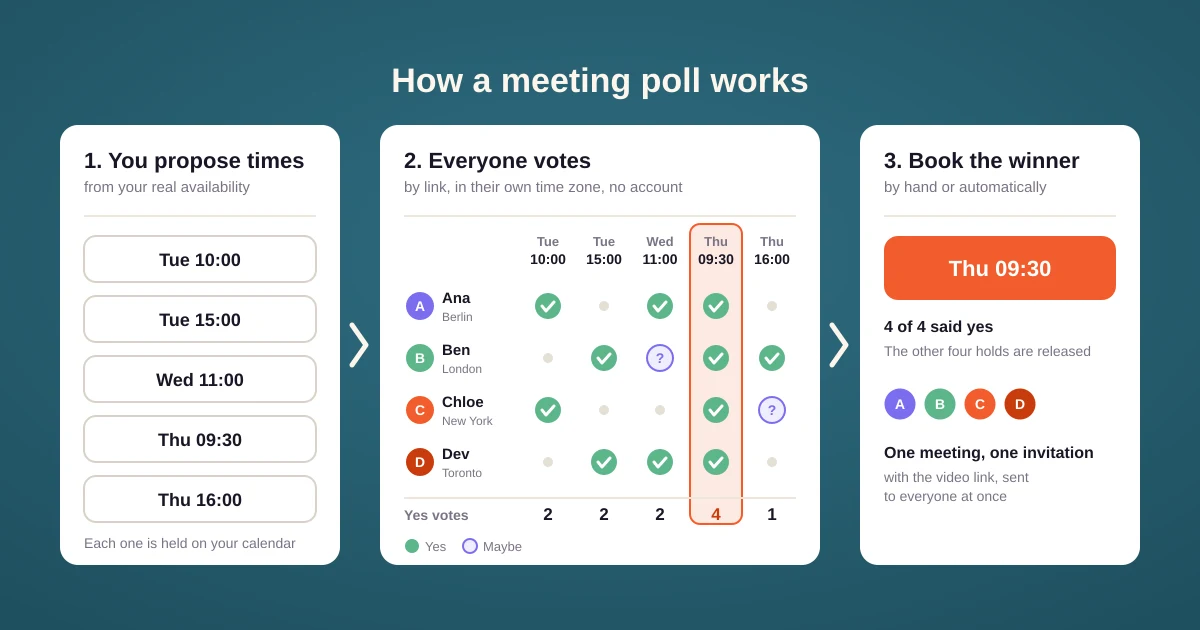
💡 While the poll is open, 42min places a tentative hold on your calendar for every proposed time. Nobody can book those slots through your other links while the group is still voting, and the holds disappear when you book the winner. The holds work on all supported calendars.
See meeting polls for the voting options in detail, such as blind voting and auto-booking.
How to pick times the whole group can make
The poll only finds the best of the times you offer. A good list of candidates matters more than the tool.
- Offer five to eight times. Fewer and nobody fits, more and people stop reading. A meeting with multiple people needs a little more choice than a call with one.
- Spread them out. Cover at least three different days and both mornings and afternoons, so a single busy day does not sink the poll.
- Respect time zones. For a group in New York and Berlin, the overlap is the European afternoon and the American morning. Put most options there.
- Leave a few days of notice. Times tomorrow morning are already gone for most people by the time they open the poll.
2. When it is one host and many attendees
A webinar, a class or open office hours is also a meeting with multiple people, but the attendees do not need to agree on anything. You choose the times, and each attendee takes a seat in the session that suits them. That is free group scheduling: one booking page, a seat limit per session, and a separate confirmation for each attendee.
Tips for scheduling meetings with multiple people
- Mark only the people who really must attend as required. Every required person can block the booking, so keep the list short.
- Use blind voting for sensitive groups. When people cannot see the running count, they vote for what works for them instead of following the crowd.
- Book as soon as there is a winner. Every hour a poll stays open, someone's calendar fills up.
- Poll once for a recurring meeting. Use the poll to find the first slot of a weekly sync, then keep that time for the series.