Calendly vs Cal.com

Calendly vs Cal.com comes down to who is paying and for how many people. Calendly is the scheduling tool most invitees already know, with a strong set of sales integrations and a free plan that stops at one event type. Cal.com gives a single user much more for free and charges teams less per seat, but its team features sit behind the paid plans just like Calendly's.
One thing changed in 2026 that most comparisons have not caught up with: Cal.com is no longer open source in the way it used to be. This guide compares Calendly and Cal.com on official pricing, team scheduling, calendars and integrations, explains what the open source change means, and shows which tool fits which kind of user.
Calendly vs Cal.com at a glance
| Feature | Calendly | Cal.com |
|---|---|---|
| 🆓 Free plan | 1 event type, 1 calendar | 1 user, unlimited event types and calendars |
| 💳 Paid plans from | $10 per seat a month | $12 per user a month |
| 🔁 Round robin | Teams plan | Teams plan |
| 👥 Collective events | Standard plan | Teams plan |
| 🧭 Routing forms | Teams plan | Teams plan |
| 📆 Recurring meetings | Not available | Teams plan |
| 🍏 iCloud and CalDAV calendars | Not supported | Supported |
| 💰 Payments | Standard plan | Free plan |
| 🔐 SSO | Add-on on Teams, included in Enterprise | Organizations plan |
💡 The short version of Calendly vs Cal.com: for one person, Cal.com's free plan is the better deal. For a team, both tools charge per seat for the same core features, Cal.com charges a little less, and Calendly reaches further into enterprise sales tools.
Calendly and Cal.com official pricing
Both tools charge per person per month. The prices below are for yearly billing. Paying month to month costs more on both: Calendly Teams, for example, is $20 instead of $16.
| Level | Calendly | Cal.com |
|---|---|---|
| Free | Free: 1 event type, 1 calendar connection, Calendly branding | Free: 1 user, unlimited event types, payments, 100+ apps |
| One person, paid | Standard: $10, unlimited event types, 6 calendars | No separate tier: the free plan covers it |
| Team | Teams: $16, round robin, routing, Salesforce | Teams: $12, round robin, routing, recurring events, no branding |
| Company | Enterprise: from $15,000 a year, 50 seat minimum | Organizations: $28, sub-teams, SSO, compliance. Enterprise: custom |
💰 For a team of five on yearly billing, Calendly Teams costs $960 a year and Cal.com Teams costs $720 a year. The gap grows with every seat, and on both tools a new hire who only needs a booking link still adds a full seat.
Where Calendly is stronger
- Invitees know it. A Calendly link needs no explanation. For outbound sales, where the invitee owes you nothing, a familiar booking page removes a small amount of friction.
- Meeting polls on every plan. Calendly lets you propose several times to a group and book the winner, even on the free plan.
- The enterprise sales stack. Teams sends meetings to Salesforce and connects Marketo and Pardot. Enterprise adds routing by Salesforce account owner and Microsoft Dynamics.
- Admin controls at scale. Managed event types on Teams, then domain control and an audit log on Enterprise.
Where Cal.com is stronger
- A real free plan for one person. Unlimited event types and calendars, payments through Stripe and PayPal, and two-way Salesforce and HubSpot sync, all at no cost.
- Lower team pricing. $12 per user against Calendly's $16, with the same core team features.
- Recurring meetings. Calendly has no recurring series on any plan. Cal.com's Teams plan does.
- More calendars. Cal.com connects Apple iCloud and any CalDAV server. Calendly connects Google, Microsoft 365 and Exchange only.
- An easy way in. Cal.com imports your Calendly account in one click, even on the free plan.
Is Cal.com still open source?
For years the main argument for Cal.com was that it was open source and you could host it yourself. In April 2026 that changed. The code behind the hosted Cal.com is now private, and the public repository became Cal.diy, a community edition under the MIT license.
Cal.diy is free to run, but it is not Cal.com on your own server. Its own documentation lists what was removed: Teams, Organizations, Insights, Workflows and SSO. It recommends Cal.diy for personal, non-production use only, and there is no hosted version.
⛔ A common mistake is to choose Cal.com for a team because "we can always self-host it for free". The self-hosted edition has no round robin teams, no workflows and no team analytics, so a team that wants those features pays for the hosted Teams plan either way.
Calendly vs Cal.com: which one should you choose?
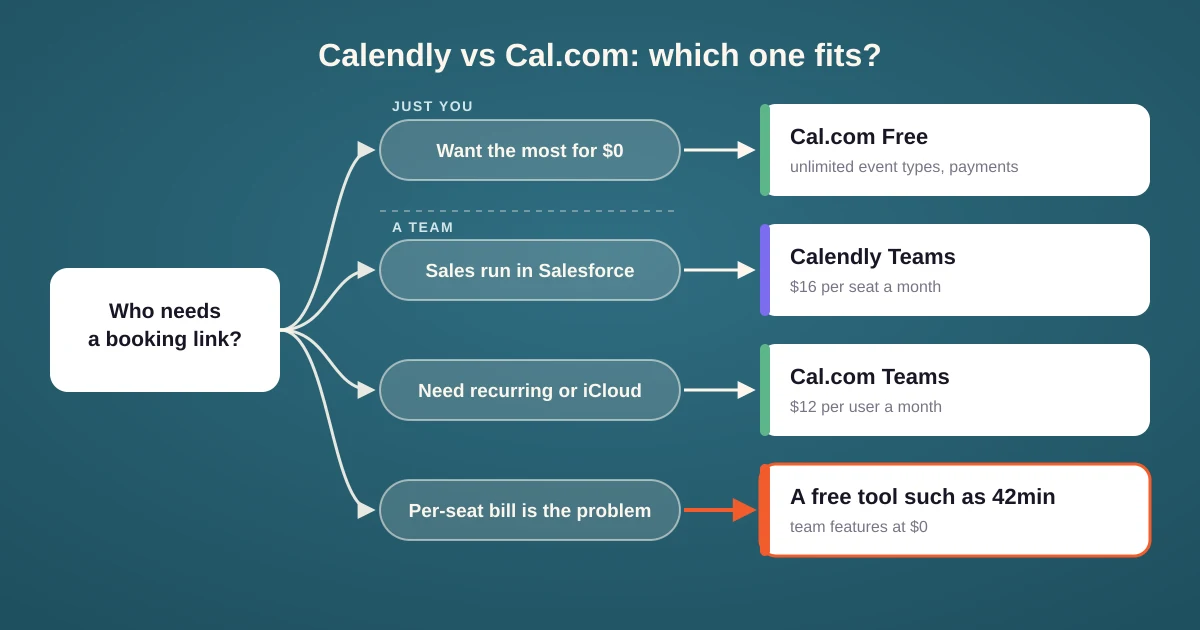
- Choose Calendly if your team sells into Salesforce, your invitees are strangers who will trust a familiar page, or you need meeting polls without another tool.
- Choose Cal.com if you work alone and want the most for $0, or if your team needs recurring meetings or iCloud calendars and you want to pay less per seat.
- Look further if the per-seat bill is the problem. On both tools, round robin scheduling, routing and workflows start at the team plan. Non-profits and education choose 42min because of the free plan.
A third option: 42min
42min sits between the two on purpose. It has the team features of Calendly Teams and Cal.com Teams, without per-seat pricing: round robin, routing forms, workflows, meeting polls and recurring meetings are all free, for every member you invite. It connects Google, Microsoft, Apple iCloud and any CalDAV calendar, and imports your Calendly event types, schedules and contacts.
For a feature by feature view, see 42min vs Calendly and 42min vs Cal.com.
Tips before you switch
- List the links you have shared. Email signatures, website buttons and sales sequences all point at the old tool. Plan to update them on the same day.
- Rebuild routing by hand. Whether you move from Calendly to Cal.com or the other way, event types usually import, but routing rules and workflows need to be rebuilt. Check each rule against a test submission.
- Connect every calendar first. A host whose calendar is missing looks free all day and gets double booked.
- Price the next hire, not this month. A per-seat tool gets more expensive with every person who needs a booking link.