What is Zoom Scheduler?
Zoom Scheduler is the booking tool built into Zoom. You publish a page with your free times, the other person picks a slot, and Zoom Scheduler puts the event on both calendars with a Zoom meeting already attached. It does the same job as Calendly or any other scheduling link, from inside the Zoom app you already have open.
Until recently a basic version came free with every Zoom account. That ended in November 2026, and most of what is written about Zoom Scheduler is now out of date. This guide explains what Zoom Scheduler does, who can still use it for free, what it costs per month, how to set up a booking page, and when a separate scheduling tool connected to Zoom is the better choice.
What Zoom Scheduler does
You open it from the Zoom desktop app (More, then Scheduler) or from the Zoom web portal. Everything it does starts from a booking page:
- Booking pages. A page for one kind of meeting, with its own length, availability and link. Zoom calls the personal kind "One to One".
- Team pages. "Any Host Available" is round robin: the meeting goes to a teammate who is free. "All Hosts Available" needs everyone at once, and "One to Many" lets several attendees book the same slot.
- Calendar checks. Zoom Scheduler reads your Google Calendar, Microsoft 365, iCloud or Zoom Calendar and hides the times you are busy.
- A meeting per booking. Each booking gets its own Zoom meeting, created with your default Zoom settings. Google Meet and Microsoft Teams can be chosen instead.
- Sharing. A link, a QR code, a block of times pasted into an email, or the page embedded on your website.
Is Zoom Scheduler free?
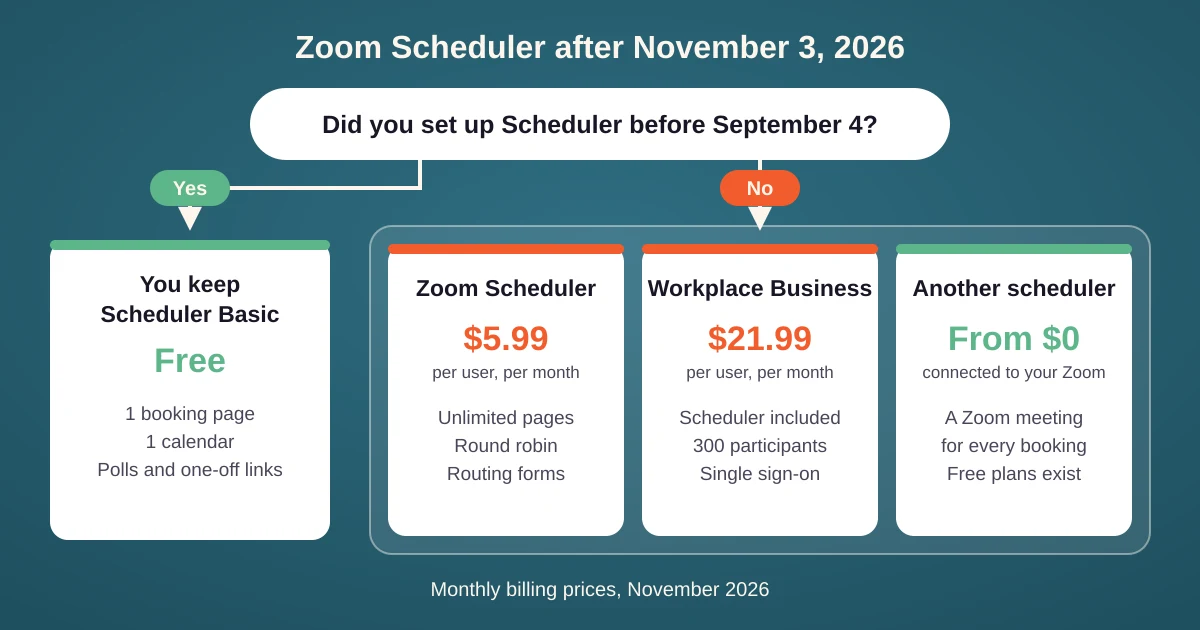
Not for new users. Starting November 3, 2026, Zoom Scheduler Basic is no longer included in the Zoom Workplace Basic and Pro plans. Scheduler Basic was the free tier: one personal booking page, one connected calendar, and unlimited polls and one-off links.
- You keep it if you activated and set up Zoom Scheduler before September 4, 2026, or if you already pay for Scheduler.
- You lose it if you are on Workplace Basic or Pro and had not set it up by that date. Your booking pages are deactivated and take no new bookings.
- Old links show a notice. Anyone who opens a deactivated page is told it is no longer active and asked to contact you directly.
- Existing bookings stay. You can still view and cancel them, but not reschedule them.
- New accounts get a trial. 14 days of the full Scheduler, then a paid plan.
💡 Zoom Pro does not include Zoom Scheduler. This surprises people who pay for Zoom every month: Zoom lists Scheduler as part of Workplace Business, Business Plus and Enterprise Plus, and on Basic or Pro it is a separate purchase. If your booking link stopped working this month, this change is the likely reason.
Zoom Scheduler pricing
Prices per user with monthly billing, as of November 2026:
| Plan | Price per month | What you get |
|---|---|---|
| Scheduler Basic | Free, existing users only | 1 booking page, 1 calendar, polls and one-off links |
| Zoom Scheduler | $5.99 per user | Unlimited booking pages, round robin and group meetings, 6 calendars, email and SMS reminders, routing forms, no Zoom branding |
| Zoom Workplace Business | $21.99 per user | Everything in Scheduler, plus 30 hour meetings for 300 participants and single sign-on |
💰 At $5.99 Zoom Scheduler is about half the price of Calendly Standard, and it includes round robin and routing forms, which Calendly keeps for its $20 Teams plan. It is still a price per host: a team of ten pays $59.90 a month on top of what it already pays for Zoom.
How to create a Zoom Scheduler booking page
- Open Scheduler. In the Zoom desktop app click More, then Scheduler. In the web portal, open the Zoom Products menu in the top right corner and choose Scheduler.
- Connect your calendar. The first visit starts a short setup that asks for it. Without a calendar you cannot create a booking page.
- Create the page. Click the add button, choose One to One under "Create a booking page", and finish. Then edit the name, the duration, the link and your available hours.
- Add your questions. Ask what the attendee wants to discuss, and adjust the emails attendees receive.
- Share it. On the Booking pages tab click Share. The tabs are Share Link, QR Code, Add to Email and Add to Website.
Where Zoom Scheduler stops
- Every host needs a seat. Round robin across ten people means ten paid users, whether they take one meeting a month or fifty.
- The 40 minute limit still applies. A booking page on a free Zoom account creates meetings that end after 40 minutes, whatever length the page offers.
- A short calendar list. Google, Microsoft and iCloud are covered. A Fastmail, Zoho or Nextcloud calendar is not, so time on it is not blocked.
- Payments in two countries. Taking a payment at booking goes through Stripe and is available in the US and the UK only.
- The phone app is limited. It creates One to One and one-off pages. Team pages need the desktop app or the web.
⛔ A common mistake is to skip the booking tool and paste your Personal Meeting ID link into every invite. It is the same room every time, so the 3 pm guest can walk into the 2 pm call that is running late. A meeting created per booking, with a waiting room and a passcode, is what a scheduler is for, and it is reason enough to use one.
Zoom Scheduler, Calendly and 42min compared
You do not need Zoom's own scheduler to book Zoom meetings. Any scheduling tool that connects to your Zoom account creates a Zoom meeting for each booking, and moves or removes it when the booking is rescheduled or canceled.
| Zoom Scheduler | Calendly | 42min | |
|---|---|---|---|
| 🆓 Free plan | Not for new users | 1 event type, 1 calendar | Everything |
| 💵 Paid from, per user | $5.99 | $12 | No paid plan |
| 🎥 Zoom meeting per booking | Yes | Yes | Yes |
| 👥 Round robin | Paid | Teams, $20 | Free |
| 🧭 Routing forms | Paid | Teams, $20 | Free |
| 📅 Calendars | Google, Microsoft, iCloud, Zoom | Google, Microsoft, iCloud | Google, Microsoft, iCloud and any CalDAV server |
In 42min you connect Zoom once and set an event type's location to Zoom. Each booking then gets its own meeting with the waiting room and a passcode on, a team can share one company Zoom account, round robin costs nothing per host, and a group event becomes a Zoom Webinar when your Zoom plan has webinars.
When Zoom Scheduler is enough
| Situation | Use | Why |
|---|---|---|
| ✅ You set up Scheduler Basic before September 4 | Zoom Scheduler | You keep one free page, which covers a single kind of meeting |
| 🏢 Your company is on Workplace Business | Zoom Scheduler | The full version is already paid for |
| 🧑💻 Solo, on free Zoom or Zoom Pro | A scheduling tool with a free plan | Zoom now charges $5.99 a month for what free plans elsewhere include |
| 👥 A team that shares leads | A tool without a price per host | Round robin on Zoom Scheduler means a paid seat for every teammate |
| 📅 Calendar on Fastmail, Zoho or Nextcloud | A tool with CalDAV support | Zoom Scheduler cannot read those calendars |
Tips for scheduling Zoom meetings
- Replace a dead link everywhere. If your Zoom Scheduler page was deactivated, the old link sits in your signature, your LinkedIn profile and old emails. Create the new booking link first, then swap it in each place.
- Match the meeting length to your Zoom plan. On free Zoom, offer 30 minute slots. A 60 minute booking that drops at minute 40 looks worse than a short meeting.
- Leave the waiting room on. Back to back bookings overrun, and the waiting room keeps the next guest out of the current call.
- Check who the host is. For a team link, the meeting should belong to the person who takes it, or they should be an alternative host. Otherwise the guest waits for a host who is not coming.
- Test a reschedule. Book yourself, move the booking, and confirm the Zoom meeting moved too. A tool that leaves the old meeting behind sends guests to the wrong room.