How to create a book a meeting link for free
A book a meeting link is a web address that shows your free time and lets anyone pick a slot and book you, with the meeting landing on both calendars and a video link attached. You can create one in about five minutes, and you don't have to buy anything: Google Calendar, Zoom and HubSpot include a basic booking page, and the dedicated scheduling tools have free plans.
This guide shows how to create a book a meeting link step by step, which free options exist and where each one stops, what the paid plans cost per month, and where to put the link once you have it. If you want the full definition first, read what a scheduling link is.
What you need before you create a book a meeting link
Every booking link is built from the same ingredients, whatever tool you use. Have them ready and the setup takes minutes:
- A calendar the link can read. Google, Microsoft or Apple. The link hides the times you are busy, so it has to see them. If you keep a work calendar and a personal one, note both.
- Your working hours. The days and hours you want to be booked, in your time zone. Fewer hours is fine; a link that offers 8 am to 8 pm gets 8 pm bookings.
- A meeting length. One link, one length. 15 minutes for intros, 30 or 45 for demos and consultations.
- A location. Google Meet, Zoom, Microsoft Teams, a phone number or an address. Most tools create a fresh video link for every booking.
- One or two questions. Optional, but "what would you like to discuss?" saves a preparation email.
How to create a book a meeting link in five steps
The buttons have different names, but the steps are the same in every tool. In 42min they live on the Event Types page, in Google Calendar on the calendar grid, in Calendly under Event Types too.
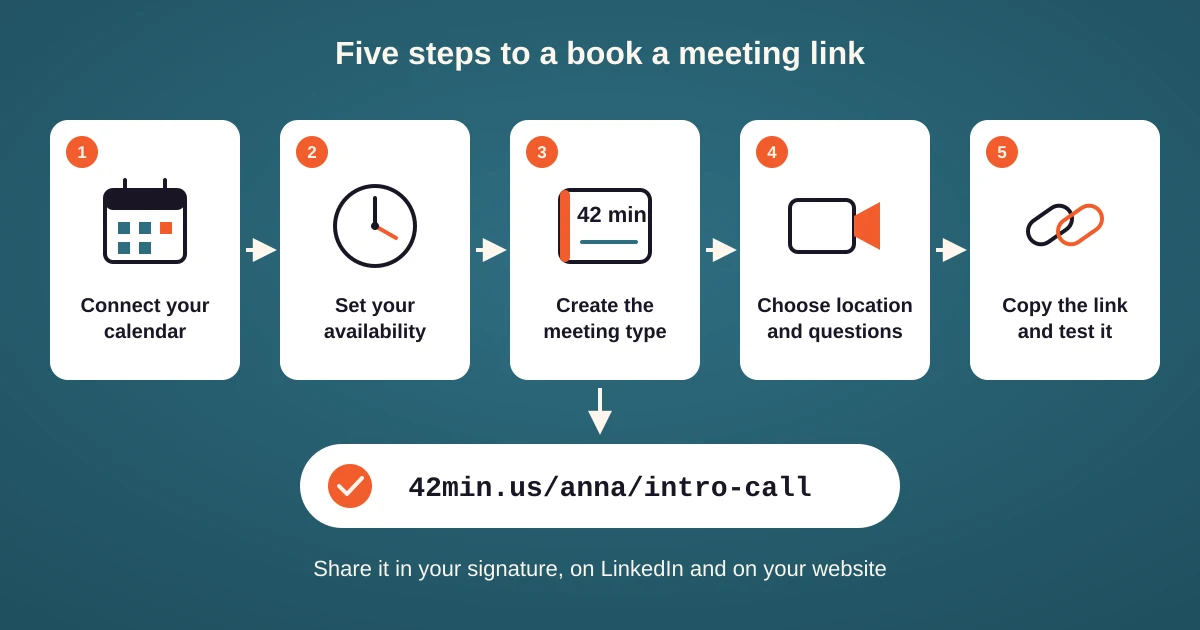
- Connect your calendar. Sign in with Google or Microsoft, or enter an app password for an iCloud or CalDAV calendar. Mark every calendar that should block time, not only the one that receives the bookings.
- Set your availability. Working hours per weekday, plus days off. Most tools let you keep more than one schedule, for example one for client calls and one for internal meetings.
- Create the meeting type. Name it after the meeting ("Intro call", not your own name), set the length, and add a buffer of 10 or 15 minutes after each meeting and a minimum notice such as 4 hours, so nobody books you for ten minutes from now.
- Choose the location and the questions. Pick the video tool so each booking gets its own link, and add your questions to the booking form.
- Copy the link and test it. Every tool gives you a short address such as 42min.us/yourname/intro-call. Book yourself once: you check the confirmation email, the calendar event and the video link in one go.
💡 Open your own booking link in a private browser window before you share it. You see exactly what the invitee sees: the time zone the page guesses, the slots it offers and the questions it asks. A surprising number of links go out with the wrong time zone, or with every slot hidden by a minimum notice set to days instead of hours.
Free ways to create a book a meeting link
Several tools you may already use include a basic booking page. Each one is genuinely free, and each one stops at a different point.
Google Calendar appointment schedules
With a free personal Google account you can create one booking page and take unlimited appointments on it. Open Google Calendar, click Create, choose Appointment schedule, set the hours and the length, and share the page. The page reads only the calendar it lives on, so a second calendar does not block time, and email reminders, payments and additional pages need a Google Workspace plan.
Outlook Bookings with me
Microsoft's personal booking page lives in Outlook on the web, under Calendar. It is part of the business and education Microsoft 365 plans, so if your employer gives you Outlook you probably already have it. The personal and Family Microsoft 365 plans do not include it.
Zoom Scheduler Basic
Any Zoom account can turn on Scheduler Basic: one personal booking page, one calendar connection, and a Zoom meeting created for each booking. Several pages, team scheduling and automatic reminders are in the paid Scheduler.
HubSpot free CRM
The free HubSpot CRM includes one personal meetings link per user, and every booking creates a contact in the CRM, which is the point of using it. The page carries HubSpot branding, and the address of the link cannot be changed once it is created.
Scheduling tools with a free plan
- 42min: every feature on the free plan, including several calendars, unlimited event types, team round robin, group bookings and routing forms.
- Calendly: one active event type and one calendar connection.
- Cal.com: unlimited links and calendars for one user. Team features are paid.
- TidyCal: unlimited booking types and bookings, one calendar connection, and a TidyCal logo on the page.
- SavvyCal: no free booking. You can set up links and run meeting polls, but a link only takes bookings on a paid plan.
⛔ A common mistake is to build the free link on the work calendar and forget the personal one, or the other way round. A page that reads one calendar happily books a client over your dentist, and the first you hear of it is the double booking. Connect every calendar that holds real appointments, or pick a tool that reads more than one on its free plan.
Paid options and what the money buys
Monthly prices per user, for the plan that turns on the feature most people pay for. Every tool is cheaper on yearly billing; the table shows the month-to-month price so the numbers compare. Prices as of November 2026.
| Tool | Free plan | Paid from | What the paid plan adds |
|---|---|---|---|
| 42min | Everything | No paid plan | Round robin, groups, routing forms, workflows and the API are all free |
| Calendly | 1 event type, 1 calendar | $12 Standard, $20 Teams | Unlimited event types, 6 calendars and reminders; Teams adds round robin and routing |
| Cal.com | 1 user, unlimited links | $15 Teams, $37 Organizations | Team pages, round robin, routing forms and removal of the Cal.com branding |
| SavvyCal | No free booking | $12 Basic, $20 Premium | Basic turns links on and includes round robin; Premium adds payments and custom domains |
| TidyCal | Unlimited types, 1 calendar | $29 once, or $12 Pro | The one-time plan adds video links and ten calendars; Pro removes the branding |
| Zoom Scheduler | 1 page, 1 calendar | $4.99, yearly billing only, or included in Workplace Business | Several pages, team scheduling and reminders |
| HubSpot | 1 meetings link | $20 Sales Hub Starter | Removes the branding and adds more links; round robin needs Professional |
| Google Calendar | 1 booking page | $14 Workspace Business Standard | Several pages, email reminders and payments |
| Outlook | None on personal plans | $7.20 Microsoft 365 Business Basic | Bookings with me, plus Exchange, Teams and the Office web apps |
💰 Read the last column: what the paid plans sell is mostly team scheduling, the removal of branding and reminders. A solo consultant can create a book a meeting link for free with every tool here except SavvyCal. A team of five pays $100 a month for Calendly Teams or $75 for Cal.com Teams to get round robin and routing, which 42min includes at no charge.
Which book a meeting link to create
| Situation | Create this | Why |
|---|---|---|
| 🧑💻 Solo consultant or freelancer | One event type per meeting length, and a personal page that lists them | A built-in page from Google or Zoom is enough if you have one calendar |
| 👥 Sales or support team sharing leads | A team link with round robin | One address for the whole team; the tool picks who takes the meeting. The built-in pages are personal only |
| 🧭 Demo requests you need to qualify | A routing form in front of your booking pages | Big accounts reach a senior rep, students get a help page, nobody books the wrong person |
| 🎓 Classes, webinars and office hours | A group link with seats | Many people, one time slot, a cap on attendance |
| 🔁 Weekly sessions with the same client | A recurring link | One booking creates the whole series, so nobody rebooks every week |
Where to put your book a meeting link
- Your email signature. One line, "Book a meeting with me", linked to your personal page or your most common meeting type. It gets more clicks than anything else you own.
- The reply to "when are you free?" Offer two times in the email and add the link for everything else. A bare link reads as "you do the work".
- LinkedIn. Premium profiles can set the custom button to "Book an appointment". Everyone else can put the link in the Featured section or the About text.
- Your website. A button that opens the booking page in a popup, or the page embedded on the Contact page, so the visitor never leaves.
- Offline. A QR code of the link on a business card, a slide or a conference badge.
Tips for a book a meeting link that gets booked
- Name the link after the meeting. "intro-call" tells the invitee what they get; "john-smith" tells them nothing.
- Keep one link per meeting length. A 15 minute intro and a 60 minute workshop are two links, not one link with a long form.
- Shorten the booking window. Two weeks ahead instead of two months. People pick sooner dates, and sooner dates have fewer no-shows.
- Recheck the link when your calendar changes. A new job or a new email account often means a disconnected calendar, and a link that reads nothing offers every hour of the day.
- Put the reschedule link in the confirmation. Plans change; one click to move the meeting saves a round of emails and keeps the booking instead of losing it.